My last two posts diverted from my speed testing exploits. This post will continue where I left the trail of the Pause script step. It causes a to me unexpected speed bump, that is, a temporary drop in performance. The question is, how much does it matter? Probably not a lot. After all, when things such as long running scripts need to be fast, one would not have any Pause steps. Right? Well, one needs some, but they won’t harm a lot. Okay, but are there other, more useful, script steps that have a similar effect? There are at least a few others.
What are ‘speed bumps’?
A summary of a previous post.
I found out that ( on a Mac M1 with MacOS Ventura and Sonoma ) FM runs into a ‘speed bump’ ( for my lack of a better word ), when it executes a Pause step. Obviously, the step itself is meant to cause a delay. However, subsequent steps actually take longer to execute then they did before the pause. After some time, the effect subsides and things run as fast as they did before the Pause step. Put into a graph, it looks like this. It depicts what happens when a Pause step is executed every 1000 loops. Note that the graph does not show the duration of Pause step itself.
The speed bump pattern
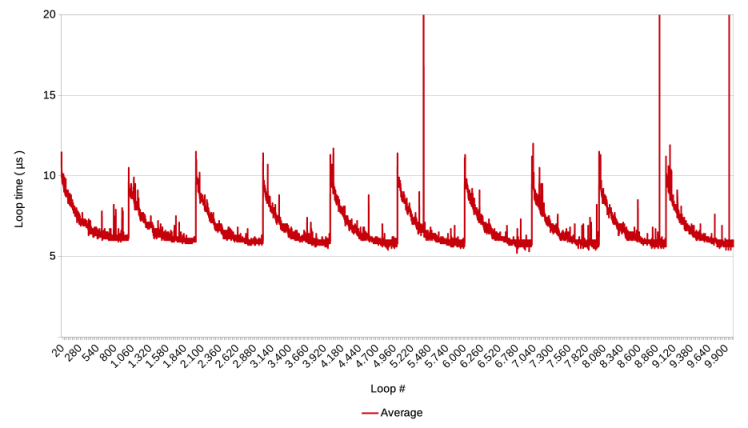
Also note that the spike at the start is not caused by a Pause step, but probably by the launch of the script. My best working hypothesis for what is happening, is that the Pause step somehow causes a drop in CPU time that the OS dedicates to the FM process. For example, smaller or fewer time slices in a Round-Robin distribution system. After FM finishes the pause and continues the script execution, the OS notices that FM is demanding or needing CPU time again, and gradually gives it more time. The latter also seems to happen when the script starts.
Method for finding speed bumps
How to identify other script steps with the same effect? One could simply test all steps. For those interested in making FileMaker faster, it may be worth the while to know all the profiles. However, it would take too much work. Instead, with the working hypothesis in mind, I tested script steps that might also cause a signal to the OS that FM is in some kind of wait state. Like waiting for disk IO, an internet call, a user action.
I tested these suspected script steps on a stand alone FM client, by using a modified Baseline script v4. The Pause step of line 34 was replaced with the script step(s) that was tested. It meant that the progress update would not work well, but since the script ran only for some seconds, that was a small price to pay. Depending on the script step, other changes were necessary as well. For example to test the Write To Data File, the data file had to be opened and its ID saved in a variable.
For each script step that I had identified as a potential speed bump, I ran three preliminary test runs of 50.000 loops divided into 25 laps and plotted the results in a graph. If none of the three runs showed the pattern described above, it was deemed to not be a speed bump. Those that did show the pattern were then tested ten times, and their graphs and files saved for reference.
Results
The following script steps were preliminarily checked and did NOT show the speed bump pattern.
- Open File
- Open File, and directly after Close File
- Set Error Capture on, and directly Set Error Capture off ( was not a candidate, but needed for another test that triggers an error upon repeat )
- Open Data File
- Open Data File, and directly after Close Data File
- Write To Data File ( write a single number and append line feed )
- Export Field Contents
- Save Records as Excel
- Insert File ( 209 Kb FM file )
- Insert File ( 284 MB FM file )
- Open URL
- Set Web Viewer
- Send Event [ “TextEdit” ; “aevt” ; “oapp” ] Wait for completion set to off. ( TextEdit did not open )
- New Window
- New Window, directly followed by Close Window
- Flush Cache to Disk
The following script steps DO show the speed bump pattern
- Insert from URL
- Send Event [ “TextEdit” ; “aevt” ; “oapp” ] Wait for completion set to on. ( TextEdit did not open )
- Send Email ( via client )
- Send Email ( via smtp )
- Show Custom Dialogue
For those who want to see the test results of these positive finds, please download this .zip.
For the hack of it, the OnRecordLoad and OnLayoutEnter triggers were also tested with empty scripts. They did not show the speed bump pattern either.
Conclusion
Based on an informed guess about potential script steps, four more script steps could be identified that also cause ‘speed bumps’ in the execution of scripts. Of those, Show Custom dialogue is the least likely to appear in long running scripts. Whether the others are likely to occur in such scripts, depends very much on the nature of the scripts, but if they are needed, they are difficult to avoid.
The five script steps have in common with the Pause step that FM has to wait for an external entity ( application, machine or user ) to finish a required action. However, the reverse is not true. Other script steps have in my eyes a similar dependency but do not show speed bump patterns.
Perhaps their actions are performed fast enough that the OS does not become aware of FM’s wait state. Perhaps they would cause speed bumps when many are executed in a short time – for example Write to Data File – that a prolonged wait state occurs with a resulting speed bump.
The test was limited to the possibilities of FMP 19, whereas FM 2025 is released. A mayor addition in recent FM versions are the AI script steps. Interactions with AIs are operated through API calls, which mean that these step perform actions similar to Insert from URL. So, it would not be surprising if AI script steps show speed bump behavior as well.
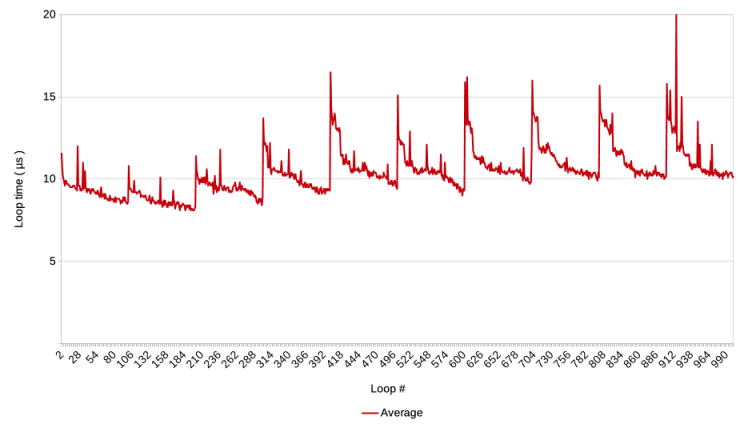
Now that it is settled that script steps exist that are both relevant for long running scripts and causing a speed bump, the next question that should be addressed, is, how important are these delays in a numerical sense? After all, after a speed bump script step, the speed gradually increases again to the base level before that step. See the graph at the start of the article, then the effect might be rather limited. That might be. However, in the post on Baseline test v4, some of the measured speed bumps added up to an increased base line, as in the graph below. Could that go out of control? This will be the topic of the next post.
Frank van der Most, 27 November 2025
PS on November 28th, a change was made to the conclusion. Initially, it erroneously read that “five more script steps could be identified” instead of four more script steps. The Send Email step was counted twice.
 Rubber Boots Data